

API rate limiting caps how many requests a client can send to a server in a given window. Exceed the cap and the server returns HTTP 429 Too Many Requests, usually with a Retry-After header telling the client when to try again. The point isn't punishment. It's keeping infrastructure stable, distributing capacity fairly across every account, and enforcing the pricing tiers a business actually depends on.
TL;DR:
- Most APIs use sliding window counters with Redis for accurate, memory-efficient rate limiting, avoiding boundary-burst issues inherent in fixed windows.
- When receiving a 429 response, clients should respect the
Retry-Afterheader and implement exponential backoff with jitter to prevent self-inflicted request floods.- Enforcing rate limits at multiple layers—edge, gateway, and application—ensures protection against abuse, fairness, and specific business logic, especially at scale.
- Public APIs typically reject excess requests with 429s, while internal systems prefer throttling through queuing to smooth traffic without losing data.
- Proper documentation, consistent enforcement, and proactive monitoring of 429 responses and
RateLimit-Remainingheaders prevent disputes and ensure reliable API operation.
Table of Contents
- API Rate Limits Cheat Sheet for Developers
- What's the Difference Between Rate Limiting and Throttling?
- Why Do APIs Need Rate Limits?
- How Do Rate Limiting Algorithms Actually Work?
- What Headers and Status Codes Should an API Return?
- How Should Clients Handle a 429 Response?
- How Do You Implement Rate Limiting at Scale?
- How Do You Test and Monitor API Rate Limits?
- What Legal and Compliance Issues Come With Rate Limiting?
- Quikturn's Take: Defaults We'd Ship Without Debate
- Get Quikturn's API Without the Guesswork on Limits
- Sources
- FAQ
API Rate Limits Cheat Sheet for Developers
Before the deep dive, here's what you need to check when you hit a new API.
| Header | Meaning |
|---|---|
X-RateLimit-Limit / RateLimit-Limit | Total requests allowed in the current window |
X-RateLimit-Remaining / RateLimit-Remaining | Requests left before you get cut off |
X-RateLimit-Reset / RateLimit-Reset | Seconds or timestamp until the window resets |
Retry-After | Seconds to wait before retrying, sent with a 429 |
Limits get measured in different units depending on the API. Requests per minute (RPM) is the most common, but token-based APIs like OpenAI's also track tokens per minute (TPM) and tokens per day (TPD), and some platforms cap concurrency directly, meaning the number of simultaneous open requests rather than a rate over time.
The one rule that covers 90% of cases: when you get a 429, stop hammering the endpoint and read the Retry-After value before you send another byte.
What's the Difference Between Rate Limiting and Throttling?
Rate limiting rejects requests outright once a client crosses its cap. Throttling delays or queues those requests instead of refusing them, smoothing traffic rather than cutting it off. Both solve the same underlying problem, controlling request volume, but they produce very different client experiences.
A public API protecting itself from abuse usually rejects hard: send a 429, stop the request cold, force the client to back off. A payment processor smoothing outbound webhook delivery, on the other hand, often prefers throttling: queue the excess and drain it steadily rather than dropping data.
Here's when each approach fits:
- Hard reject (429): public-facing APIs, anti-scraping defenses, anything where a bad actor could otherwise flood you for free.
- Queue and throttle: internal service-to-service calls, batch jobs, webhook delivery, or any pipeline where losing a request is worse than delaying it.
- Hybrid: many production systems reject once a hard ceiling is breached but throttle in the zone just below it, buying the client a few seconds of grace before the wall hits.
Why Do APIs Need Rate Limits?
An engineering team at Devops-daily documented a case where a single unthrottled client nearly took down a production API by flooding it with retries after a downstream timeout. The fix was rate-limiting middleware added under pressure, not something planned in advance. That's the pattern behind most "why didn't we have this already" incidents: nobody notices the gap until one client behaves badly enough to expose it.
Rate limits solve four distinct problems, and conflating them is where a lot of implementations go wrong:
- DDoS and abuse protection. A cap on request volume is the cheapest defense against both malicious floods and scraping bots.
- Runaway client prevention. Bugs happen. A retry loop with no backoff can generate thousands of requests per second from a single misconfigured client, and rate limits are the backstop that keeps one bad deploy from becoming an outage.
- Fair multi-tenancy. Without caps, your heaviest user degrades service for everyone else on shared infrastructure.
- Pricing and business logic enforcement. Free tier versus paid tier isn't just a billing line item, it's an actual rate limit that keeps the free tier from consuming the resources you're charging for elsewhere.
Pro Tip: Watch for a sudden spike in 429 responses paired with a flat or dropping revenue line. That combination usually means a paying customer is getting throttled by mistake, not that abuse is happening.
Monitor two signals continuously: the rate of 429s per client (a spike usually means either abuse or a broken retry loop) and cost anomalies tied to specific API keys. Both catch problems before support tickets do.
How Do Rate Limiting Algorithms Actually Work?
Five algorithms cover almost every production rate limiter you'll encounter, and each makes a different trade-off between memory cost, accuracy, and burst tolerance.
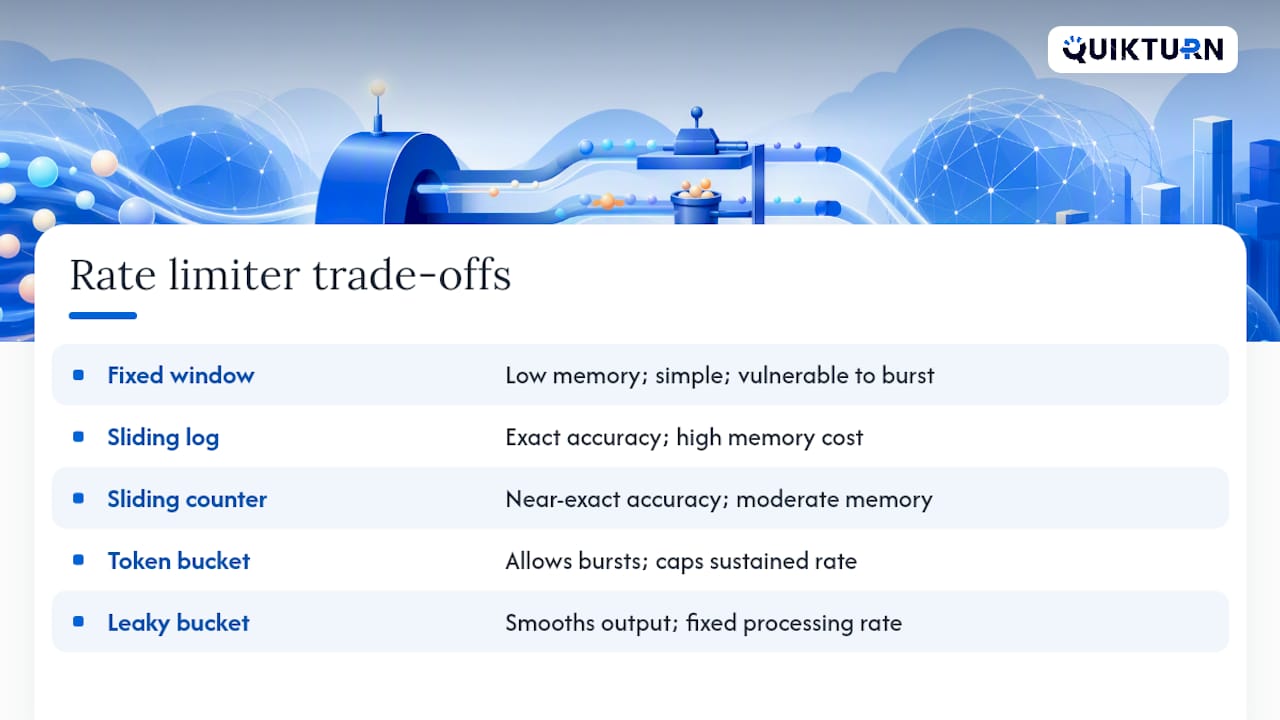
Fixed window counts requests in discrete time blocks, say, 0 to 60 seconds, then resets. It's simple to implement and cheap to run, but it has a real flaw: a client can burst at the very end of one window and the very start of the next, doubling the effective limit for a brief moment.
Sliding window log stores a timestamp for every request and counts how many fall inside a rolling window. It's exact, but the memory cost scales with request volume, which makes it expensive at high throughput.
Sliding window counter splits the window into smaller buckets and weights them proportionally, getting close to the accuracy of a full log with a fraction of the memory. A production engineering reference comparing all five algorithms recommends this one as the pragmatic default for most APIs, since it avoids both the fixed-window boundary bug and the sliding-log memory overhead.
Token bucket fills a bucket with tokens at a steady rate and lets clients spend them, permitting short bursts as long as the bucket has tokens saved up. This is why developer-facing APIs tend to favor it: it feels forgiving for normal usage patterns while still capping sustained abuse.
Leaky bucket processes requests at a fixed output rate regardless of how they arrive, which suits systems that need smooth, predictable downstream load more than burst tolerance.
Implementation matters as much as algorithm choice. A distributed systems guide on rate limiting recommends atomic Redis operations, INCR combined with EXPIRE, or a Lua script for the sliding window counter's two-key pattern, rather than reading and writing counts in separate steps that race under concurrency.
What Headers and Status Codes Should an API Return?
Return 429 Too Many Requests, not 503 Service Unavailable, when the cause is a client exceeding its quota. The distinction matters for automated clients: 503 implies the server is down and worth a blind retry, while 429 tells the client it's specifically responsible for backing off.
Pair the 429 with these headers so the client knows exactly what happened and when it can try again:
Retry-After: seconds until the next allowed request, the single most important header for automated retry logic.X-RateLimit-LimitorRateLimit-Limit: the total allowance for the window.X-RateLimit-RemainingorRateLimit-Remaining: how much is left before the client hits the wall.X-RateLimit-ResetorRateLimit-Reset: when the window resets.
There's a header naming split worth knowing about. The older X-RateLimit-* convention, used by plenty of established APIs, predates any formal specification. An IETF draft standard for rate-limit headers proposes the unprefixed RateLimit and RateLimit-Policy fields as a cleaner, standardized alternative. Neither is universally adopted yet, so expect to see both conventions in the wild for years. Stripe's API documentation shows a real-world case of exposing both global and endpoint-specific limits, including concurrency caps alongside standard rate windows, which is worth studying if your API needs per-endpoint granularity rather than one blanket limit.
| Status code | When to use it |
|---|---|
| 429 | Client exceeded its rate or quota limit |
| 503 | Server itself is overloaded or down |
How Should Clients Handle a 429 Response?
Naive retry logic is the single biggest cause of rate-limit incidents on the client side. A client that immediately retries a failed request, especially in a loop, turns one 429 into a self-inflicted flood. Here's the sequence that actually holds up in production:
- Read the
Retry-Afterheader first. If the server tells you exactly how long to wait, respect that number before anything else. - Fall back to exponential backoff with jitter when no
Retry-Afteris present. Double the wait time on each failure (1 second, 2, 4, 8) and add a small random offset so a fleet of clients doesn't all retry in lockstep. - Cap total retries. Three to five attempts is typical; beyond that, surface the failure instead of retrying indefinitely.
- Add a circuit breaker. If a client sees repeated 429s from the same endpoint within a short window, say five failures in 30 seconds, stop sending requests entirely for a cooldown period rather than continuing to probe.
- Make retries idempotent. Use idempotency keys on write operations so a retried request that actually succeeded the first time doesn't create a duplicate charge, order, or record.
An engineering guide on rate-limit best practices points out that most 429 incidents trace back to exactly this gap: missing backoff logic, not malicious traffic.
Pro Tip: *Track RateLimit-Remaining proactively instead of waiting for a 429.
Batching requests and queuing non-urgent calls during high-traffic periods reduces how often you brush against the ceiling in the first place, which is cheaper than handling failures after the fact.
How Do You Implement Rate Limiting at Scale?
Enforcement usually happens at three layers, and each catches a different failure mode. The edge or CDN layer (Cloudflare is a common example here) blocks obvious abuse before it ever reaches your infrastructure. The API gateway layer enforces per-key and per-tier limits consistently across every service behind it. The application layer handles business-logic-specific limits that a generic gateway can't express, like capping a specific expensive operation regardless of a client's overall quota.

Don't use in-process counters, a variable in application memory, for a horizontally scaled service. Each instance would track its own count independently, so a client could get several times its intended limit just by hitting different servers. A rate limiting engineering guide recommends a centralized store like Redis with atomic operations instead, so every instance reads and writes the same counter.
Fail-open versus fail-closed is a decision you need to make deliberately, not by accident when Redis goes down at 2 a.m. For general read traffic, fail open, let requests through if the rate limiter itself is unreachable, because losing availability is worse than briefly losing enforcement. For sensitive endpoints like authentication or payment processing, fail closed: reject requests rather than risk an attacker exploiting a limiter outage to bypass protection entirely.
- Edge/CDN layer: blocks volumetric abuse before it costs you compute.
- Gateway layer: enforces per-key and per-tier quotas consistently.
- Application layer: handles business-specific limits a gateway can't see.
- Centralized store (Redis) with atomic ops: the only safe pattern behind multiple instances.
Pro Tip: At extreme scale, routing requests for a given key to the same gateway node via consistent hashing lets you use fast local counters instead of a round trip to a central Redis instance on every single request. It's a pattern Cloudflare and similar edge networks rely on.
How Do You Test and Monitor API Rate Limits?
Load testing your own limits before a client discovers them for you is one of the cheaper insurance policies in API development. Simulate a client sending requests right up to, and past, the documented cap, and confirm the 429 and headers fire exactly where your documentation says they will.
- Run controlled load tests that ramp request volume past the documented limit and verify the exact request count where 429s begin.
- Track key metrics continuously: the rate of 429 responses per client, the trend of
RateLimit-Remainingacross your top accounts, and p95 latency on the limiter check itself, since a slow rate limiter can become its own bottleneck. - Set alert thresholds on sudden spikes in 429 rate, not just absolute counts, since a proportional jump catches problems a raw number misses.
- Follow a triage playbook when 429s spike: confirm whether it's a single client or broad, check if it correlates with a recent deploy on either side, throttle further if it's abuse, and raise the limit or reach out proactively if it's a legitimate customer scaling up.
Postman's documentation on request throttling offers a practical framework for testing 429 behavior that's worth running through before any limit change ships to production.
What Legal and Compliance Issues Come With Rate Limiting?
Rate limits sit closer to contract law than most engineering teams assume. If your terms of service promise a certain tier of access for a certain price, the rate limit you actually enforce needs to match what you've published, or you're exposed to a straightforward breach-of-contract complaint from an enterprise customer.
Transparency is the practical safeguard here. Document your limits in public API reference material, not just in a support article a customer has to hunt for after they've already been throttled. OpenAI publishes tiered limits by model and by account level directly in its developer documentation, which sets a clear expectation before a developer ever writes a line of code against it.
Fair access matters in regulated contexts too. If your API serves financial data, healthcare information, or anything touching accessibility requirements, an undocumented or inconsistently enforced rate limit can create a discrimination exposure, particularly if one customer segment effectively gets worse service than another for the same price tier without disclosure.
Data residency and audit requirements can also interact with rate limiting in ways teams miss. If you log every rejected request for abuse analysis, that log itself may fall under the same data retention and privacy rules as your primary application data, especially if it captures IP addresses or account identifiers tied to individuals.
None of this replaces legal counsel for a specific contract or jurisdiction. But building rate limits with documentation and consistency in mind from the start avoids most of the disputes that end up needing a lawyer at all.
Quikturn's Take: Defaults We'd Ship Without Debate
If you're building a rate limiter from scratch today, start with a sliding window counter backed by Redis. It gets you close to exact accuracy without the memory bill of a full request log, and it avoids the boundary-burst bug that makes fixed windows unreliable. Reserve token bucket for endpoints where you specifically want to reward burst-friendly usage, like a batch export feature.
Before shipping, run this three-item checklist: expose RateLimit-Remaining and Retry-After on every response, not just the rejected ones; make sure your counter increments are atomic, never read-then-write in separate steps; and write error messages that tell a developer exactly when to retry, not just that they were denied.
We built Quikturn's own API and developer tooling around exactly these defaults, because the teams integrating logo search and company data into live deal workflows can't afford ambiguous throttling behavior in the middle of a live pitch build.
— Quikturn Team
Get Quikturn's API Without the Guesswork on Limits
Most APIs make you find their rate limits the hard way, by hitting a wall mid-integration and reading the error message for the first time. Quikturn documents its request caps and fair-usage tiers directly in the developer docs, so you know your ceiling before you write your first query against the 17-million-logo database.
Whether you're pulling company logos into a live deck, enriching deal data through the REST API, or wiring up the MCP server for an AI agent workflow, Quikturn's plans map usage tiers to real limits instead of vague "fair use" language. Teams running high-volume workflows, bulk logo processing for a portfolio review, or continuous enrichment across a deal pipeline, can move to enterprise plans built for that scale. Check the pricing page to see which tier fits your call volume, then get your API key and start querying.
Sources
- API Rate Limiting Strategies: 2026 Engineering Reference
- API Rate Limiting Best Practices 2026 | APIScout
- Designing Rate Limiting for APIs: Algorithms, Patterns, and Implementation
- What is API Rate Limiting? Understanding Request Throttling and Best Practices
- API Rate Limiting: How It Works & How to Implement It (2026)
FAQ
What Are API Rate Limits?
An API rate limit caps how many requests a client can make in a set time window. Exceeding it triggers an HTTP 429 response, typically with a Retry-After header showing when to try again.
How Do I Fix an API Rate Limit Exceeded Error?
Read the Retry-After header on the 429 response and wait that long before retrying. If it's missing, use exponential backoff with jitter and cap your retries at three to five attempts rather than looping indefinitely.
How Do I Rate Limit an API to 10 Requests Per Minute?
Use a sliding window counter or token bucket with a time-based window, backed by a shared store like Redis so the count stays accurate across multiple server instances.
How Long Is Too Long for an API Call?
There's no universal cutoff, but most production APIs time out requests within a moderate timeframe, and anything routinely approaching that range signals you should paginate, batch, or move the work to an async job instead.
Does Quikturn's API Have Rate Limits?
Yes. Request caps and tiered usage limits should be documented in developer docs, so integrators know their expected ceiling before building against a logo and company data API.